
What Is Spyware? 8 Types, 5 Examples, And How It Enters & Exists In Your System
“Wait…I feel like someone’s watching us”, said one of the texts you sent to your mum 5 mins ago. “Really? But who?” replied the last website you visited on your browser. That’s spyware, reading, watching, recording, and transmitting all the activities you do on your device like a naughty kid, but…without making a single sound.
99% of the odds are, you have spyware in your device RIGHT NOW, as you’re reading this blog. The solution? Understanding how it enters and exists in your device is the first layer of protection.
This guide will help you turn invisible threats into recognizable risks so you can take vital security precautions. Let’s goooooooo!
What is Spyware in Cyber Security?
When it comes to spyware definition in cybersecurity, it’s a malicious software secretly operating in your device, and sending your personal data to third parties. All of this mess is to steal your information for targeted advertising (which is gonna benefit the giants).
But here’s the most alarming thing about it: it doesn’t just randomly steal your data. Contrarily, it picks the specific and the most sensitive data, such as login passwords, browsing history, payment card data, banking details, and contacts, just to name a few.
And you don’t even know when you’re being spied on because it gets installed & moves silently as if everything is normal in your device. That’s why it’s considered a major cybersecurity threat for any business or organization. That’s concerning, right?
But wait…there’s more drama to it. Keep reading…
Because you can’t detect it easily, it enables larger attacks, which often lead to identity theft, account takeovers, and even ransomware.
To help you differentiate between spyware in cybersecurity and consumer spyware, here are the quick key differentiators:
| Consumer View | Cybersecurity View |
|---|---|
| Software that spies on you | Persistent malware |
| Personal privacy issue | Privacy and security breach |
| Individual victim | Individual, business, or enterprise risk |
| Annoying | High-impact data compromise |
In this guide, we’ll dive deeply into spyware in cybersecurity and what are the common ways attackers use to collect user data without consent.
How Spyware Works?
When you understand the entry point, purpose of the action, and exit point of the spyware, it’s way easier for you to protect yourself, or even your business security. So, here’s how the spyware operates, typically.
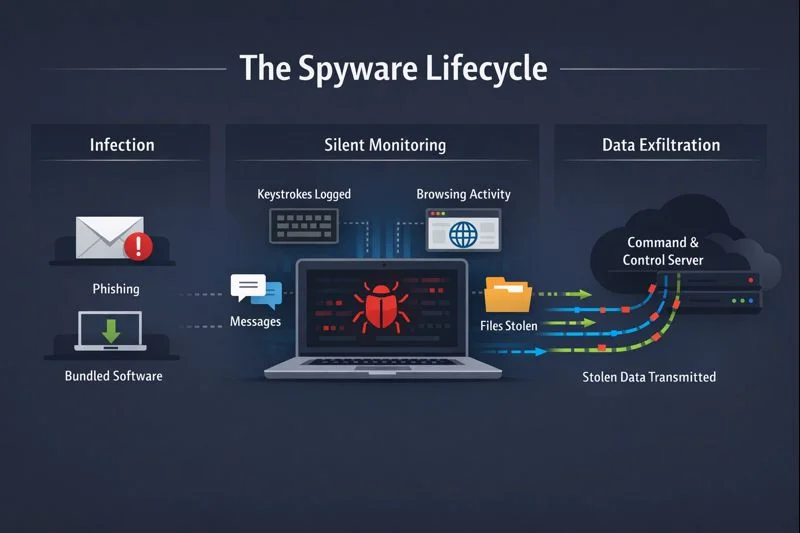
- Entry Point: Phishing emails with malicious links and bundled software downloads are the common entry points. And it becomes easier if your system has security vulnerabilities.
- Silent Installation: Spyware installs itself in the systems without triggering any warnings by anti-virus software. And once it’s IN the system, it immediately focuses on persistence.
- Monitoring: It will review user activity such as keystrokes, capture login credentials, track browsing behavior, access files, and even the messages you’re exchanging with your contacts.
- Data Transmission: After the spy has collected enough data, it sends it to remote command-and-control (C2) servers that are controlled by the attacker on the backend.
- Continuous Background Operation: Spyware, if not detected and prevented from, keeps working in the background that enabling credential harvesting and intelligence gathering.
8 Major Types of Spyware
Depending on the type of data access the hackers need from your system, there are different spyware techniques, mainly divided into 8 types.
| Spyware Type | Technique | Data Monitored | Security Risk |
|---|---|---|---|
| Adware | Shows irrelevant and unwanted ads while collecting your user data | Browsing habits, search queries, and click behavior | Medium |
| Infostealers | Scans systems to locate and steal specific sensitive information | Login credentials, emails, financial data, stored files | High |
| Keyloggers | Records every keystroke typed on your device without your knowledge | Passwords, messages, form inputs, and credit card details | High |
| Rootkits | Hides spyware deep in the operating system to avoid detection | System activity and privileged access data | High |
| Red Shell | Tracks user behavior, often installed alongside games or applications | Online activity, attribution data, browsing patterns | Medium |
| System Monitors | Continuously observes overall system and user activity | Screenshots, applications used, emails, websites visited | High |
| Tracking Cookies | Tracks behavior across websites and browsing sessions | Browsing history, preferences, location data | Low–Medium |
| Trojan Horse | Disguises itself as legitimate software to deliver spyware payloads | Credentials, sensitive files, system access | High |
5 Spyware Examples To Demonstrate How Data Is Secretly Collected & Transferred
Understanding how many types of spyware can be applied is beneficial; however, seeing real-world examples boosts your understanding of how it can possibly show up to you. Here we go with the 5 most common examples of spyware in 2026:

1. Pegasus Spyware
Pegagus is the most well-known and sophisticated malware because it is designed to track nearly every aspect of a victim’s digital life. It has the ability and access to access your private conversations to your real-time exact location. Mostly, it’s linked to government or state-sponsored operations.
Here’s how it’s executed:
- A device is infected with zero-click vulnerabilities in apps such as iMessage.
- Once it’s done, Pegasus installs its payload in the system’s memory silently.
- Then, your data will be monitored and stored continuously.
- The collected data is sent to the third-party or the attacker’s command-and-control.
- By using system hooks and root-level access, it maintains the access.
2. Keylogger-Based Spyware
As the name tells you, keylogger spyware is meant to track every key typed on your keyboard. And this is the best technique used by hackers to access your login credentials and sensitive banking details, aka cybercrime.
Here’s how it’s done:
- It’s commonly installed via phishing emails, fake software downloads, or malicious attachments.
- To avoid any kind of security alert, the keylogger’s files are written to system directories or disguised as legitimate processes.
- Then, the spyware hooks into the operating system’s keyboard input layer to capture all typed data.
- In the hidden or encrypted files, the keystrokes are stored locally. Sometimes, it even captures screenshots or monitors open applications.
- The collected data is sent to the attackers while the startup scripts, registry entries, or scheduled tasks are modified to keep working after reboot.
3. Adware With Spyware Capabilities
Adware-based spyware shows up as software that delivers ads but secretly collects user browsing data. You might accidentally download it from browser extensions, mobile apps, or free applications. While it can’t harm you on a higher level, it’s still a threat to your privacy & protection.
Here’s how it’s executed:
- As mentioned earlier, it’s often bundled with free apps or browser extensions, and you’d typically grant permissions without even knowing.
- While you’d interact with other apps, it will keep running quietly in the background.
- It can collect sensitive information such as the websites you visited, search queries, clicks, and sometimes even the device metadata.
- Then, it shows you the highly personalized ads based on your browsing data.
- Your user behavior is directly sent to ad networks or third-party analytics servers, often using HTTPS requests to avoid detection.
- Meanwhile, it keeps the background processes working to track the browser sessions.
4. Trojan-Delivered Spyware
Trojan-delivered spyware hides inside software that appears legitimate, such as cracked apps or fake updates. But this method is dependent on whether the user executes the code or not. Still, it’s one of the most used and common delivery methods for both individual and organizational targeting.
Here’s how it works:
- You’d download and install software that seems solid and official to you.
- Once you have downloaded the Trojan runs and installs spyware elements into the system.
- Then, the spyware might request permissions or exploit already given consent to access sensitive areas of the device.
- It can track keystrokes, screenshots, system information, or stored credentials, which are connected to attacker-controlled command-and-control servers for real-time monitoring.
- Just like all the other techniques, it keeps modifying the startup services, schedules tasks, or system files to survive reboots.
5. Red Shell Tracking Software
Contrary to the above 4 spyware examples, Red Shell isn’t leveraged for crimes (in most cases). However, it’s a commercial tracking and attribution software developed to help game publishers & software companies to help understand where the user came from before installing their product.
Here’s how it typically works:
- When you have downloaded a video game or software from an unofficial resource, there is a higher chance that it contains Red Shell software.
- Then, Red Shell starts working in the background without triggering any alerts, so you never get to know about it.
- It monitors the web traffic and browsing behavior without consent and acts like they’re researching marketing attribution signals (what a time to be alive 😣)
- Then, the data they’ve collected is utilized in running marketing campaigns or referral sources.
- Using the standard network connections, the attack will send the data back to Red Shell’s servers by blending in with normal application traffic.
- Red Shell keeps working behind the scenes as long as the host application is installed on your device.
Frequently Asked Questions
Is Spyware a Virus?
No, spyware doesn’t count as a virus. It’s a dangerous branch of malware that acts like software staying in a device without the user’s knowledge. However, the process of the spyware into the device is a virus.
What Are The Famous Spyware Attacks?
The most famous, common, and sophisticated attacks are Pegasus (by NSO Group), GhostNet (targeted 1000+ computers in 103 countries), DarkHotel (targeting high-profile travelers), and Zbot (banking targeting banks).
How Do I Know If My Phone Is Being Spied On?
It’s typically hard to detect spyware on your device, but strange data usage, unexplained behavior, strange messages or calls, and overheating are some of the clear signs your phone is being spied on.
Does McAfee Remove Spyware?
Yes, McAfee removes spyware automatically by following a proper process of assessing the files and then quarantining the suspicious files. Then, the infected files are permanently removed to prevent harm.
Can Spyware Track My Location?
Absolutely yes! Most smartphones have built-in GPS, and the spyware can exploit vulnerabilities to access GPS data. And that’s how it can see your exact location in real time.
It’s A Wrap!
Getting to know about spyware meaning, its types, how it works, and how it can possibly attack is highly beneficial. But here’s the thing…if you’re just reading for “knowledge” and don’t plan to take proactive security decisions, it won’t make a difference.
Spyware is highly invisible and can lead to major privacy loss for both individuals and businesses. And the fact of the matter is, it’s pretty hard to avoid it because it’s almost everywhere. But some security precautions can save you from so much hassle later on.
Plus, if you seriously want to secure your business, you can talk to one of the cybersecurity experts on our team. And get a personalized plan for yourself for FREE!